Why won't my TV turn on?
Please try the following steps to troubleshoot the issue.
Step-by-Step Troubleshooting:
1. Check Power Cable Connections
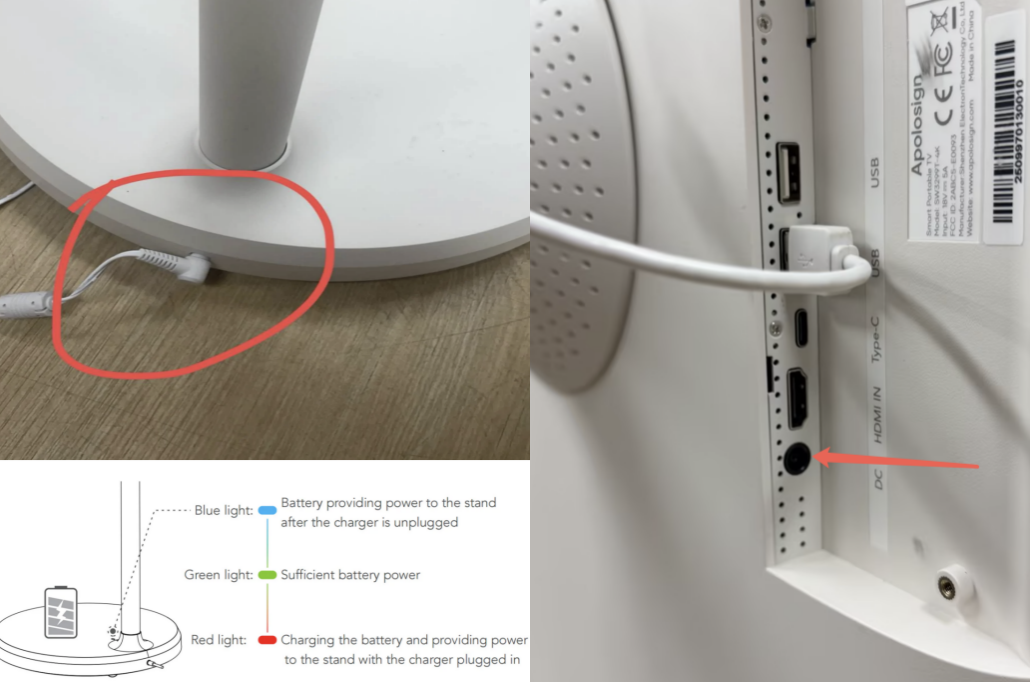
If the screen does not turn on, it may be due to the screen not receiving power from the battery. Please check the power cable connections in two places to ensure they are secure and correct:
① The connection between the stand and the base.
② The connection between the stand and the screen.
2. Verify the Battery
If the connections are secure, please plug in the charging cable and check if the charging indicator light turns on.
3. Direct Power Connection to the Screen
Please try connecting the charging cable directly to the port on the back of the screen.
Why can't my TV be used without being plugged in? Why won't my TV charge?
To use your device wirelessly, the base must be sufficiently charged. Please follow these steps to check the battery and power connection:
Check the Dock Connection: Ensure the charging cable is firmly plugged into the device dock/base (not just the screen).
Base with Power Cord: When the base is plugged in, what color is the indicator light? (e.g., is it Red, or is it Off?)
Base without Power Cord: When you unplug the cord to use it wirelessly, is the base indicator light Blue? If it is Off, the battery may be depleted.
Screen Test: Try connecting the power cable directly to the back of the screen. If the screen turns on normally, the problem lies with the base.
Why won't my remote control turn on the device? Remote control not working?
Since our remote control connects via Bluetooth, the Bluetooth connection also shuts down when the machine is turned off. Therefore, the Bluetooth remote cannot be used to turn it on because the connection has been severed.
You might wonder why it seemed possible to turn the TV on and off via Bluetooth before. This is because when Bluetooth shuts down the TV, it doesn't power it off immediately. Instead, it puts the TV into sleep mode, and only after a period of time does it fully power off. Therefore, during the sleep period, you could use the Bluetooth remote to turn it back on. However, once it's completely powered off, you cannot use the Bluetooth remote to turn it back on.
With the power connected, simply press the power button on the back of the device for 2 seconds to turn it on.
Remote doesn't work in the Netflix/YouTube app
The Apolosign portable screen is designed as a large-format Android tablet rather than a traditional TV. Because it runs on a mobile-based Android system, certain apps (like Netflix) are optimized for "touch" input rather than "remote" navigation. This is a common characteristic across most portable Android displays on the market today and is not a defect of your specific unit.
Recommended Solutions: